Running a small business means you probably rely on email, cloud software, online payments, shared files, remote access, and connected devices every day. Such tools make work easier, but every account, laptop, phone, application, and remote connection can also create an opportunity for an attacker. Zero Trust for small business gives you a practical way to reduce that risk without assuming that every person or device inside your network security is safe.
You may think your company is too small to attract cybercriminals, but current breach data tells a different story.Verizon’s 2026 Data Breach Investigations Report analyzed 7,152 confirmed breaches involving small and medium-sized businesses. Exploitation of vulnerabilities accounted for 26% of SMB breach access, while credential abuse accounted for 13% and phishing for 9%. Strong identity security, device protection, access control, and continuous verification can therefore make a real difference to your business.
What Is Zero Trust for Small Business?
Zero Trust is a philosophy for cybersecurity that states you don’t automatically trust a user, device, application or connection just because it’s on your business network.You verify access before allowing someone to reach a resource and provide only the permissions required for the job. NIST describes Zero Trust Architecture as an approach that removes implicit trust based on network location and focuses on protecting individual resources.
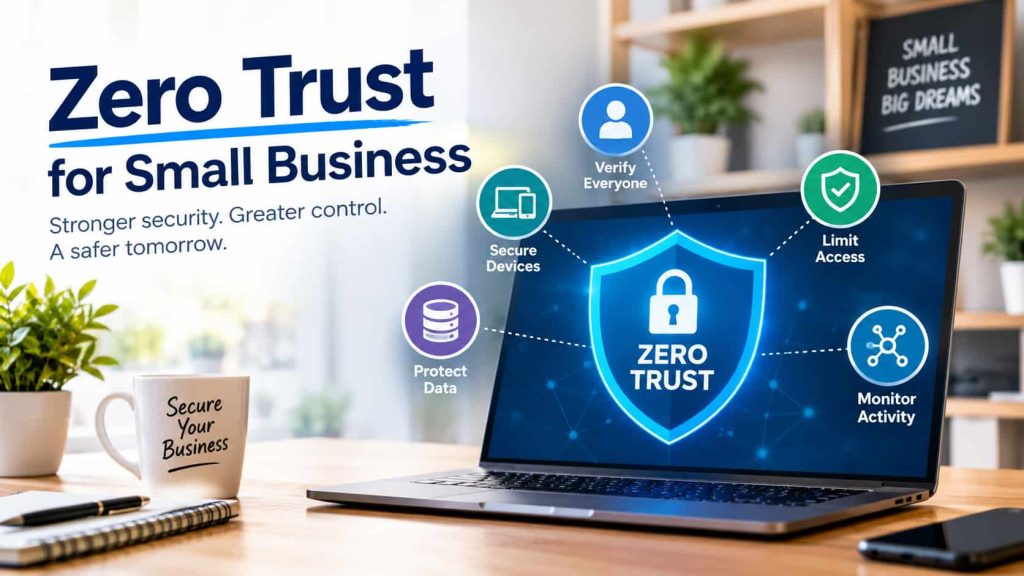
For your small business, the idea can remain simple. Whenever anyone tries to access company information, you can ask yourself: Who is asking for access? Is the account legitimate? Is the device secure? What should the employee really know? Then tools such as multi-factor authentication, least privilege access, identity management, endpoint security and activity monitoring can assist you with your zero trust security strategy.
Why Zero Trust Security Is Important for Small Business
While a small business may not have as many employees as a large corporation, it may still have valuable customer data, financial records, business documents, employee information, passwords and confidential communications. An attacker does not need to compromise an entire organization immediately. One stolen password, phishing message, or vulnerable device can provide a starting point.
Verizon’s latest SMB research shows why company size should not be treated as protection. Among the breaches covered in the 2026 DBIR, ransomware appeared in 88% of SMB breaches, showing how serious the consequences can become after attackers gain access.
What is Zero Trust Security
Zero Trust is based on a simple principle: don’t trust, always verify access. Even after a successful password login, the request shouldn’t just be given free rein. Instead, many security signals such as identity, device health, permissions, application needs, and others can be used to help decide if access should be granted.
You can also limit how far an attacker can move after compromising an account. NIST explains that Zero Trust can help reduce unauthorized access and limit lateral movement across an environment. For your business, a compromised employee account does not have to become a key that opens every system.
Verify Every User Before Giving Access
A genuine employee account does not automatically prove that the person behind a login is legitimate. Attackers regularly use stolen usernames and passwords to enter business systems, particularly when employees reuse passwords across different services.
Multi-factor authentication gives you another layer of protection because a password alone may not be enough to complete the login. Verizon’s 2025 research found compromised credentials involved in 22% of breaches reviewed in its DBIR analysis. You can make account takeover considerably harder by combining strong passwords with MFA and sensible account recovery controls.
Use Least Privilege Access
You should give each employee enough access to perform their responsibilities without providing unnecessary control over your entire business environment. Someone working with invoices may need accounting software, for example, but full administrative access to your website, email platform, cloud storage, and security key settings creates unnecessary exposure.
Least privilege access is one of the most practical Zero Trust principles because it reduces the number of resources available through a compromised account.You can also separate everyday employee accounts from administrator accounts and review elevated permissions regularly. When an employee changes roles or leaves the company, access should be adjusted or removed promptly.
Secure Every Device That Connects To Your Business
Your security doesn’t stop at authentication. Employees with secure accounts are still a risk if they connect to company systems from an old laptop, an unmanaged computer or a device infected with malware.
Secure Your Cloud Applications
Small businesses increasingly depend on cloud email, file storage, accounting platforms, customer management software, and online collaboration tools. Every cloud service adds accounts and permissions that need proper protection.
You can improve cloud security for small business by reviewing who can access each application and removing permissions that employees no longer require.Protect important business information without forcing you to abandon the cloud tools your team depends on through strong authentication, separate admin accounts, detailed file sharing controls, and regular access reviews.
Zero Trust for Remote Employees
When employees work remotely, traditional network security becomes weaker because they may log in from home, hotels, coffee shops, mobile networks, or other places. You can’t rely on office security to cover every connection when employees access resources from nearly anywhere. To improve Zero Trust for remote employees, enforce MFA, verify device security, restrict app permissions, and watch for abnormal login behavior. A remote employee should not receive unlimited access simply because the person has used the system before. Access should remain connected to identity, device security, and the actual resource being requested.
Zero Trust and Network Security
Zero Trust does not replace network security. Your firewall, secure Wi-Fi, router configuration, segmentation, DNS protection, and other network controls can still provide important layers of defense.
A useful way to view both approaches is that network security helps protect the environment, while Zero Trust focuses more closely on users, devices, applications, and resources. Your existing network security practices can therefore work alongside a Zero Trust model rather than being discarded.
How to Implement Zero Trust in a Small Business
You do not need to replace your entire technology environment to begin. A gradual Zero Trust implementation for small business is often more practical than attempting a complete transformation at once. You want to minimize unnecessary trust, but make sure day-to-day work is possible.
Defend Your Business From Ransomware
Ransomware can cause massive disruption for businesses that rely on computers, shared files, cloud services or customer data. A hacker might get in via a stolen password or a vulnerable device and attempt to move further into the environment before encrypting systems or stealing data. “Zero Trust can reduce risk by restricting permissions and segmenting critical resources. Also, keep reliable backups, keep them up to date, secure endpoints, patch vulnerable software, monitor for suspicious activity and have an incident response plan. Ransomware protection is especially important in light of Verizon’s 2026 SMB findings, which show that ransomware appeared in 88% of the SMB breaches covered by the report.
Is Zero Trust Too Expensive for a Small Company?
You don’t need to spend on an expensive enterprise security platform to get started with Zero Trust principles. Many organizations can start by using controls that are available in their email provider, operating system, cloud applications, identity platform, and endpoint security tools. Your eventual cost depends on the number of employees, devices, applications, compliance requirements, and existing security infrastructure.
Common Zero Trust Mistakes
One common mistake is to think of Zero Trust as a product. Zero Trust is a wider security strategy that encompasses identities, devices, applications, data, access policies and monitoring.Buying one security tool without changing unnecessary permissions or weak authentication will not provide you with the full benefit of the model.
Another mistake is making security so hard that employees try to find workarounds. Build policies around how your team actually works. Strong authentication, sensible permissions, clear access rules and practical security training can give you protection without creating unnecessary friction.
An Example of a Practical Zero Trust For Your Business
You own a small online business. You have eight employees who use cloud email, shared documents, accounting software and a customer management platform. One of your employees receives a convincing phishing message and enters a company password on a fake login page.
Otherwise an attacker can use the stolen credentials across multiple services. Add MFA, least privilege permissions, device protection, separate administrator accounts and monitoring and the stolen password is far less useful. Instead of a single security barrier you have multiple layers that can slow or stop an attack.
Final thoughts on Zero Trust for small business
Zero Trust for small business is not about distrusting your employees or buying complex enterprise technology. You can get started with practical security measures such as MFA, least privilege access, secure devices, strong passwords, cloud application security controls, monitoring, and regular permission reviews.
Cyberattacks aren’t just for large corporations. Recent research by Verizon shows that SMBs remain highly susceptible to the exploitation of vulnerabilities, abuse of credentials, phishing, system intrusion and ransomware. Phased Zero Trust implementation prevents over-privilege, minimizes the value of stolen credentials and builds a stronger cybersecurity baseline for your business.
FAQ
Can small businesses take advantage of Zero Trust?
Yes. Zero Trust can help even a few employees, because a single compromised account or device can expose sensitive business information. Beginning with MFA, least privilege access, device security and periodic permission reviews can provide you with meaningful protection without a large security budget.
What is the first step to zero trust for a small business?
Start with your most critical user accounts. Turn on multi-factor authentication, remove accounts that aren’t being used, review administrator permissions and make sure that employees only have access to what they need. Once identity security is strengthened, you can then begin to incrementally improve security on devices, applications, networks and data.